
At BlogHer, I spoke about the power of Pinterest in leading in referral traffic over Twitter, Google, StumbleUpon, Bing and Yahoo. I spoke about how we can create images with the intent of building community and driving traffic to the site ethically and responsibly. What I didn’t have time to discuss were steps one can take to be sure the original content they’re sharing is protected by creating watermarks.
In this age of content theft, a watermark can be a blogger’s best friend. While it doesn’t prevent theft, it can help an image gone astray be returned to its rightful owner. It can also act as a kind reminder to those who might otherwise use what is not theirs without thinking twice. Watermarking your images doesn’t require graphic design know how. From desktop to smartphone, here’s a guide to making your mark.
WHY WATERMARK?
FACT: Just because an image is on Pinterest, Facebook or Instagram does not mean anyone can take it and use it as they please. An image may only be used according to the Terms of Service on each site. Read the TOS.
As attorney and blogger Sara Hawkins explains, in regard to Pinterest, “Many images are pinned knowingly and offered up by the copyright holder. But there are also many images on Pinterest that the copyright holder has no idea is on there.”
By watermarking the content you place online, you make a statement. An important one about taking pride in your work and valuing your content. If your watermark includes your blog name, it can bring readers to your site even if the image is found on a site where you didn’t provide permission. From your site to Instagram, here are some easy ways to put the finishing touches on your images.
ON YOUR DESKTOP
Traditionally, Photoshop has been the route by which many watermark their work. Using an image or text, one can create a transparent PNG file as an overlay on graphics and photos. Another option is to save that PNG file as a brush and simply “stamp” your work. Here is a tutorial via Adobe for creating a watermark in Photoshop Elements.
Lightroom offers the option of exporting your edited photos with your watermark embedded. Adobe offers a tutorial here that walks you through the process.
If PNGs, brushes and layers aren’t your cup of tea, not to fear. You have some great options online that require zero Photoshop ability, and, as of late, I’ve found myself using them over Photoshop to quickly watermark an image with great results.
ON THE WEB
You can create watermarks with ease using free sites like PicMonkey or Pixlr. I happen to love PicMonkey’s interface and the ease with which you can use their tools and be creative. They offer a wide range of fonts (though I suggest keeping it clean and easy to read). Beyond text-based watermarks, you can also opt to use your own your logo or graphic watermark.
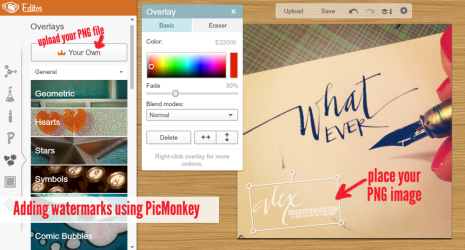 Once you’ve edited your image using PicMonkey, click on the icon for “Overlays.” On the top left you have the choice of “Your Own.” Click and upload a PNG file from your computer, and add it to the image. (If you’re not Photoshop familiar, or had someone design your site logo, you might ask about having a PNG made to coordinate with your blog design that you can use with apps, like PicMonkey.)
ON THE GO
I am really impressed with the ease of some watermarking apps for the iPhone and iPad. In fact, you might not be able to tell those I make in Photoshop from those I create on my phone while in line at the post office or in a waiting room before a meeting.
 I’ve tried various apps, but have found a few that I particularly like because they each offer something unique with high quality results. I began using Phonto to add bits of text to photos for my blog or Instagram, and later as a watermarking tool. I like the versatility and the option to import fonts (though their collection of 200+ is wonderful).
Also worth checking out is the app A+ Signature, as it allows the option of text based and handwritten mark-ups.
I think iWatermark is the easiest of the apps on the market and can reach a large audience as it is also available for Droid devices, and they have desktop versions for Mac and PC users (the Mac version can be integrated to work with iPhoto). My experience has been on the iPhone, and I love that by simply emailing myself the PNG of my watermark, I can add it to images as I do in Photoshop…and faster.
While A+ Signature and iWatermark make it easy to share your images to Twitter and Facebook, Phonto also has the option of posting to Instagram, which is a wonderful way to integrate watermarks into what you share.
Instagrams have always been publicly viewable unless one makes their account private, but Facebook’s new integration places the public Instagrams people “like” on their Timeline, giving Instagrams an even larger audience. The option to watermark them is a nice one, and Phonto makes it easy.
Whether you choose to watermark your images, or not, is entirely up to you. Respect for copyright online has a long way to go.
FACT: The notion that because you share your creative content on the web makes it public domain is untrue.
Watermark not because you’re overprotective, but because you’re proud of your contributions to this community.
Every picture tells a story, and these stories belong to us. Copyright gives us the ability, the RIGHT, to decide when and where our work is COPIED. As more and more people find their work used without their knowledge, the issue of making your mark becomes an important consideration.
The market for software and apps is large. Any favorites we all should know about? And if you have watermarking questions, please feel free to ask!